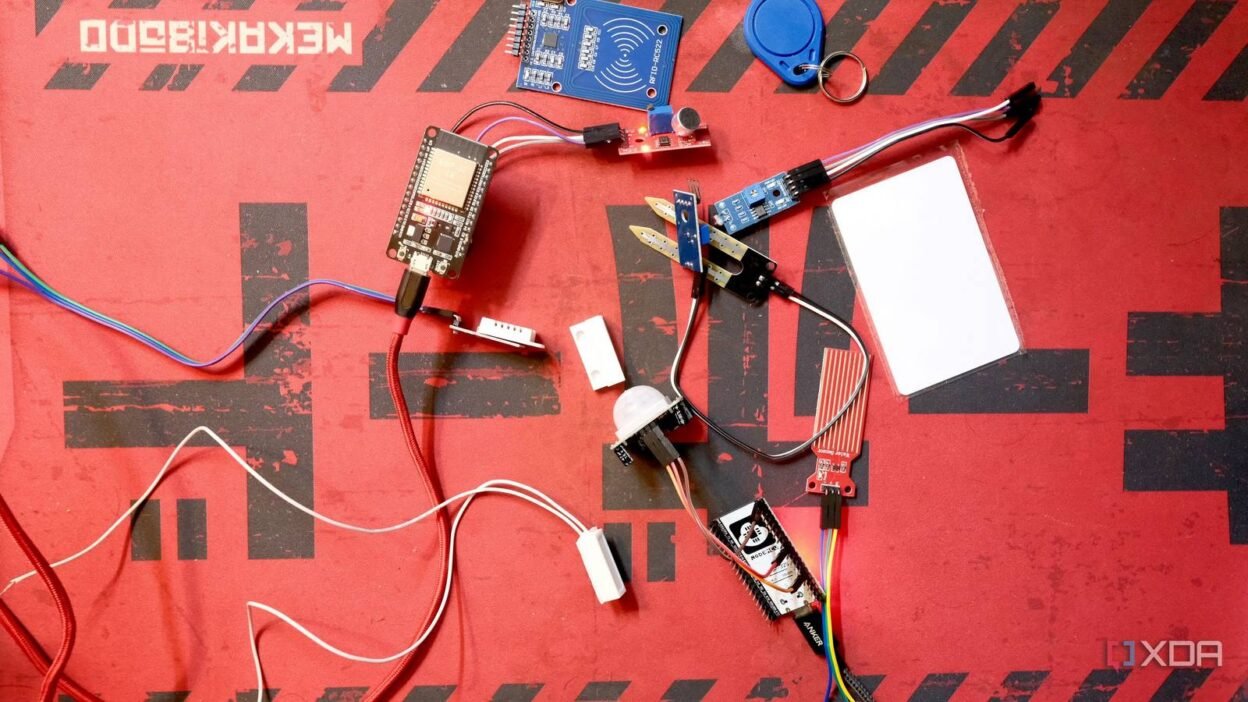
While I was proud of my smart home, it was anything but smart. Devices kept failing, and automations failed to trigger, and I spent more time troubleshooting than enjoying their promised convenience. I was on the verge of abandoning my smart home and dismantling everything until I discovered a $10 ESP32 board.
The $10 ESP32 board has been a complete game-changer. It has helped transform my approach to building a reliable, customizable smart home. I’ve stopped using Big Tech’s smart speakers and embraced the ESP32 board to take full control. Here’s how the tiny $10 ESP32 board solved my smart home’s biggest problem and became a cornerstone of my new setup.

There’s more than one ESP32, and here are the differences between all of them
If you’re looking to take the plunge into the world of ESP32 devices, then here’s a basic overview of what you need to know.
Why a $10 ESP32 works better for a smart home
Affordable solution instead of large, expensive hubs
Initially, I invested in an Apple HomePod and an Amazon Echo Plus to manage my smart home. I assumed they were enough to control my Philips Hue smart bulbs and some smart plugs, and to automate various tasks. But these smart speakers didn’t play well, especially with my older, first-generation devices.
That’s when one of my colleagues at XDA introduced me to the ESP32 microcontroller as a low-cost, highly versatile device for building my smart home. At $10, the ESP32 microcontroller packs a lot of punch. With native built-in Wi-Fi and Bluetooth support, I can wirelessly control a range of devices, including temperature sensors and Bluetooth Low Energy devices. The best part was that I didn’t need extra modules or a complicated setup for that. What sold me was the ability to create my own devices and automations from scratch, all based on the data collected from the sensors I integrated. I fine-tuned my smart home system to automate lighting, temperature control, and other niche uses, unlike proprietary smart hubs.
Compared to Arduino and Raspberry Pi, the ESP32 is power-efficient and provides everything in a single package. It operates with very low power, even in battery-powered devices, and offers plenty of GPIO pins for connecting a variety of devices and sensors. I was able to dive in and start building without getting lost thanks to the Home Assistant’s ESPHome Community Forums, GitHub, and other troubleshooting forums.
Worthy as a hub replacement
Building one for oneself is liberating

Building my own smart devices and a smart hub compatible with Home Assistant was liberating. My basic programming knowledge often helped me through several rounds of trial and error, and the reward was worth it. The commercial sensors I found cost nearly three times as much as the regular ones I hook up to the ESP32. That made the $10 board a no-brainer for building a personalized and low-cost smart home.
I started with an ESP32-DevKitC and an ESP32-H2 board. At first, the idea of soldering and wiring seemed intimidating. But I found that using DuPont jumper cables made it easier for me to connect and test out different sensors without worrying about complex wiring. I plugged sensors like temperature, humidity, and motion detection to expand my smart home’s capabilities beyond what a commercial hub could offer. Also, invest in a breadboard. It’ll save you several frustrating hours when testing new components and prevent wiring mistakes.
Bridging the Bluetooth and Wi-Fi networks
Making the sensors work with Home Assistant

The ESP32’s biggest advantage is its built-in support for Wi-Fi and Bluetooth. That made it perfect for bridging gaps and integrating different smart devices, especially those falling out of range of my Wi-Fi network. After flashing the ESPHome firmware, integrating the ESP32 into Home Assistant was quite easy using ESPHome. Next, I used the ready-made projects to build a voice satellite and made it work with a local LLM.
Next, I used an ESP32 to create a Bluetooth proxy that bridges the gap between different Bluetooth Low Energy devices and my Wi-Fi network. The seamless ESPHome integration with Home Assistant’s native API made it easy to configure and monitor the devices through a simple YAML-based firmware. For example, I added a delay to the PIR motion sensor to improve motion detection accuracy and ensure that Home Assistant triggers automations more precisely. Data from multiple sensors with millisecond precision significantly improved the responsiveness of my smart home. And it also extended coverage to areas with weaker Wi-Fi signals.
Smooth translator for different protocols
Making older devices smart

I already use a Sonoff Zigbee USB Dongle-E for Zigbee devices, and the ESP32-H2 board helped me take things to the next level. It supports Thread and Matter protocols. So, my smart home’s capabilities seamlessly extend to Thread and Matter-supported devices. While I hope this board bridges Zigbee devices to the Matter ecosystem, I am counting on improving Thread network reliability. That’s why I even used ESP32 to build an OpenThread Border Router to bridge the Thread network and connect devices to my home Wi-Fi network.

Should you use Zigbee, Z-Wave, or Matter in your smart home?
Pick the one that suits your smart home needs.
Building a personalized smart home at a low cost
Combining the ESP32 devices and Home Assistant’s multi-protocol support has helped me create custom automations that include even older devices — all thanks to the sensors. For example, my smart lights turn on at low brightness and increase as the sun sets. But first, the motion sensor checks if I’m in my room or the house before triggering the smart lights.
ESP32’s capability to integrate and manage Wi-Fi, Bluetooth, Zigbee, Thread, and Matter easily makes it my go-to choice for building a smarter home. Also, pairing it with sensors makes my smart home even smarter, even when I leave my home.