Moving house is a pain for most people, but you just have to put your head down and get on with it. When it comes to a smart home, if you have one, will know the additional complications that come with packing devices away and slowly dismantling everything from cameras, to sensors and smart locks. Having recently experiencing this myself for the second time in 8 years, I can say it’s no fun at all, but most things can be put in place over time. The same can rarely be said of smart blinds – more specifically custom made smart blinds, unless you’re lucky enough to move to a new place with similar sized windows. Whilst I was able to salvage some of my blinds for the new apartment, there was one room that although came with curtains (all the rooms did) they’d definitely benefit from some decent blinds. Fortunately, the timing was great in that I was contacted by Bringnox via No Nonsense PR in the UK to see if I was interested in reviewing their blinds, and of course this space – which is now a dining room – was the perfect place to try out a brand I’d not had any experience of, even though I’d heard of them. The process wasn’t without its problems though, although all because of me, not Bringnox. If you want to know more, read on…
CONTENTS

Roller Blinds are pretty difficult – and a little boring – to photograph, but aside from the blinds you do get a few things to accompany them. There are three manuals; one is the installation manual which covers their roller, zebra and roman shades. Then there’s one for Matter installations, and finally a quick start guide.
Aside from that there are fittings, which simply consists of some brackets, wall plugs and screws. You then get a remote, which might seem counterintuitive but is actually quite important should you need to change things. It’s also a good backup in case your smart home goes a bit wonky.


The remote comes with a wall bracket, and a couple of AAA batteries. There are other remote options available, but this one is the most basic, designed to control a single blind. It’s also worth noting that the remote is pre-paired with the specific blind it’s supplied with, so there’s no need for any additional setup or pairing. Finally, there’s a fairly long USB-A to USB-C cable, around three metres or so, used for charging the built-in motor. You get one cable per blind.


As for the blinds themselves, each one comes with its own Matter code. This is printed on a rather flimsy piece of sticky paper attached to the Thread radio antenna, so it’s worth noting it down in case it gets torn off. There’s also a second copy on the bottom bar that keeps the blind taut.

Above are the options available for this particular type of pattern/material.
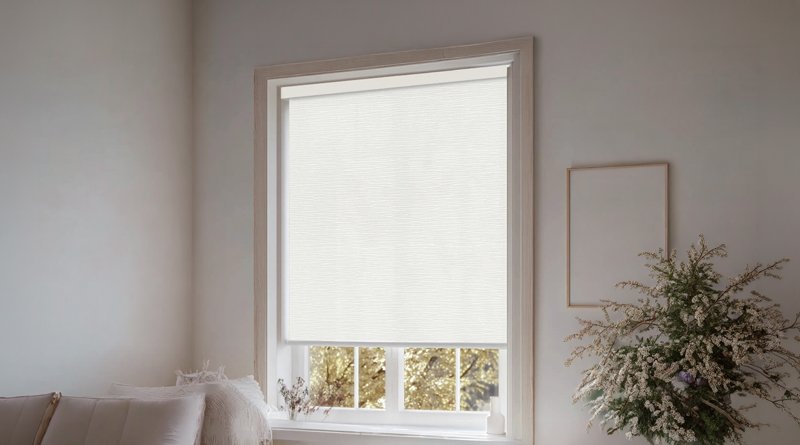
The company offers a range of materials and colours, as well as different types of materials, and in my case I chose what is labelled Treebark White 70. Treebark and white refers to the texture or pattern, and the colour, whilst the 70 is how much light is allowed through, so even though these are technically what is referred to as Blackout blinds, they’re in fact 70% blackout, so light comes through even if you can’t see through them. This is ideal for the dining room as we want some degree of privacy, but don’t need it to be so dark in the daytime or early evenings.
The material used for these particular blinds feels quite luxurious and of a very decent quality, which you’d expect from custom blinds anyway, but it’s still reassuring. The cassette that houses the blinds also feels sturdy, which is essential given that these extend to around 220cm in length.


I also opted for a valence for both blinds although in actual fact the room already has valences in place. If I hadn’t gone for valences, I could have avoided the issue I first encountered (more on that later). The blinds, whether with or without a valence, have a track along the top that allows them to click into place once the brackets are fitted, making accurate spacing a non-issue compared to blinds that have a side bracket either end. Interestingly, the top of the cassette that contains the blinds and the track, has a sort of brush barrier on one edge, presumably to minimise gathering dust.
THE BLINDS FITTED

When I measured the space for the blinds, I was extra cautious, having previously had a “mismeasurement” issue with my Smartwave dual blinds a while back (video HERE, review HERE). That problem came down to using a tape measure with non-standard units of measurement, mostly only used in Japan, which I’d assumed were inches. It all worked out in the end, but I didn’t want to risk making the same mistake again.
Back to the Bringnox blinds, and I measured the width for each blind, but overlooked how the depth of the cassettes would affect one another. As a result, the left blind initially ended up around 2cm too long. I had a couple of potential fixes in mind, but to their credit, Bringnox stepped in and immediately offered a replacement once they were made aware of the situation.


These are the final fitted blinds shown in the first image above. From the second image, you can probably tell there was no way the left-hand blind could sit behind the right-hand one, as there simply wasn’t enough depth to work with. The depth of the cassette for the blinds is roughly 71mm, and the space left after the first blind was fitted was just 66mm. I came up with one workaround, which would’ve meant the left-hand blind sat around 15mm lower than the blind on the right, but as Bringnox stepped in, it wasn’t necessary.
The third of the three images above shows the USB-C port on the edge of the motor, along with a small on/off toggle for the motor itself, and a multi-function button for pairing and resetting. Having a dedicated on/off switch on motorised blinds makes rebooting a Thread radio much easier than relying on long button presses, in my view, so it’s a welcome addition that’s missing from my Smartwave blinds.
Because these blinds are made to your exact specifications, both the width and the drop are precisely as expected. In practical terms, once they’re installed and you press the remote to close them, they’ll stop exactly where they’re meant to, assuming your measurements are correct, of course.
That also means there’s no need to set upper or lower limits, as you would with a retrofit solution like the Aqara E1 Roller Shade Driver (review HERE, video HERE). As a result, even before you’ve added them to your smart home, they’re effectively ready to use, with no adjustment required.
IN APPLE HOME


These are Matter over Thread blinds, so you’ll need both a Thread Border Router and a Matter Controller for whichever platform you plan to use. In my case, I’ve got a couple of Apple TV 4K units and four HomePod mini speakers. Only the HomePod minis act as both Thread Border Routers and Matter Controllers, while the Apple TVs function solely as Matter Controllers, but that still covers all the bases.
Both blinds added on the first attempt, and fairly quickly too, so there were no issues on that front. The slider control, similar to what you see with fans or dimmable lights, is available for adjusting the blind position, and the settings section shows the current battery level along with whether the blinds are charging.
One thing that’s missing, however, is any indication of obstruction detection. I’ve seen this on other blinds, such as my Eve MotionBlinds, although those are still using HomeKit over Thread rather than Matter over Thread. It may simply be that this is a feature Matter doesn’t yet support.
The other oddity, and something not limited to Bringnox, is that when charging the built-in battery, the charging status in settings doesn’t switch to ‘yes’. On top of that, the battery level doesn’t appear to update until some time after you’ve unplugged the charging cable.
Once again, this seems to be consistent across all the Matter blinds I’ve tested so far, which suggests the issue likely sits with Matter or Apple Home, rather than the blinds themselves.
IN AQARA HOME

Ordinarily, I wouldn’t add a device to any platform other than Apple Home, and despite some of the limitations of the Apple Home app, it’s still my go-to controller. That said, Aqara Home’s automations can go much further, and in ways that make you wonder why Apple hasn’t implemented them directly.


A good example is the ability to toggle a device with a single button press. In Apple Home, you can achieve this, but it requires converting the button press into a Shortcut. In Aqara Home, there’s a simple built-in option to toggle a device – on off, up down, and so on. More specifically for blinds, Apple Home doesn’t offer a way to assign a button press to simply stop them, whereas Aqara Home does.
With that in mind, I added both Bringnox blinds to the Aqara app via the Aqara Hub M3, which acts as both a Matter Controller and a Thread Border Router. This then allowed me to make use of an older Aqara Opple 6-button wireless switch.
I assigned the top two buttons to raise the left and right blinds, and the bottom two to lower them, with the middle pair used to stop each blind. You might argue that the included remotes already do this, but in practice, they need to be kept near their respective blinds, otherwise it’s not obvious which one controls which. With the six-button switch, everything is consolidated in one place.
On top of that, each button supports single, double, and long press actions, so it’s possible to assign preset positions for each blind, or even control additional smart home devices. That’s a level of flexibility the original remotes simply don’t offer.
THE BLINDS IN USE

Despite the initial issue with incorrect measurements, which was entirely my fault, these blinds have transformed what was a fairly drab spare room into a much more stylish dining space that we now use for every meal. It might sound a bit twee, but the right décor really does make a difference, in much the same way that pictures can completely change the feel of a bare wall. These blinds achieve that effect nicely, and although the left blind tends to stay open more often than not, largely due to the view out over the Taiwan Strait, it still provides privacy while allowing a reasonable amount of light through.
Reliability hasn’t been an issue so far, even if charging the batteries remains a bit of a guessing game, thanks to Apple Home and Matter not accurately reporting charging status or battery levels. Installation was straightforward, requiring little more than a drill and a screwdriver, so getting them up and running is about as simple as it gets. The materials feel solid and well made, and as these use Matter over Thread, they’ve also opened up more advanced automation options, particularly within Aqara Home.
If by any chance we do move again (unlikely), I really hope I can take these blinds with me, as they’re excellent. If you’re interested in getting some custom made smart blinds, check out Bringnox.com (not an affiliate link).
Bringnox Roller Blinds w/ Matter over Thread
0.00

Pros
- Very easy to install
- Decent quality materials
- Responsive – especially via the remote
- Matter over Thread
- Quiet motor